For many businesses in Australia, the implementation of a CRM system is an important step towards increasing the level of sales, customers, and business efficiency. However, of all the available systems, the Zoho CRM system is one of the most popular due to its flexibility, scalability, and applicability to businesses of all sizes.
However, simply installing a CRM does not guarantee success. A poorly planned Zoho CRM Implementation can create confusion, slow down teams, and reduce adoption across the business. Many firms are experiencing problems, not necessarily due to the platform’s inability, but also due to the implementation process being rushed or incomplete.
Understanding the most common implementation mistakes will help businesses avoid delays and ensure the platform is providing value to the operation of the business. Below are some of the key mistakes organisations often make during Zoho CRM implementation.
Common Mistakes to Avoid During Zoho CRM Implementation
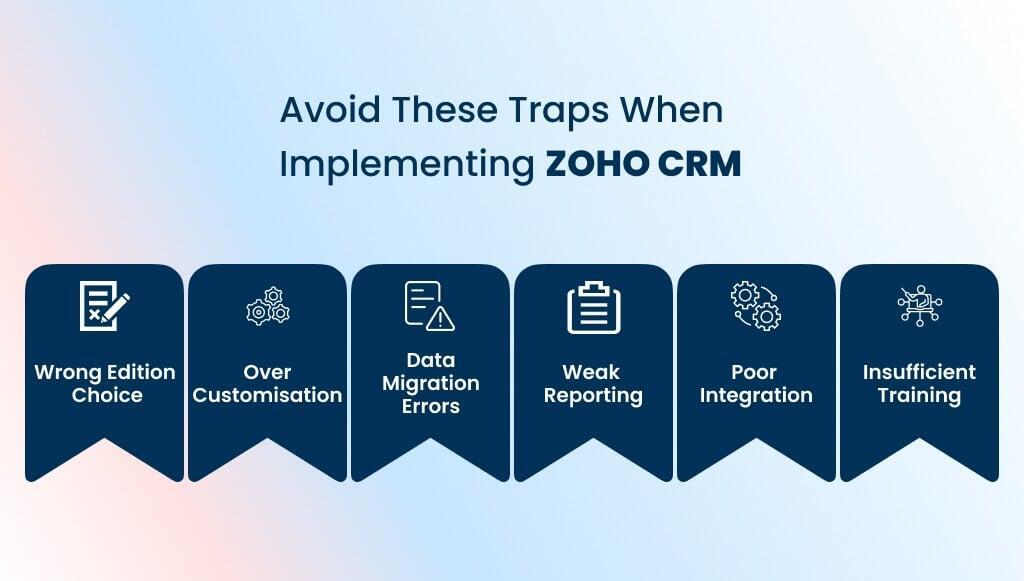
Choosing the Wrong Zoho CRM Edition for Implementation
The first decision a business has to make is to choose the appropriate edition of Zoho CRM, as Zoho offers several versions of its product with varying features and automation options.
Focusing only on cost rather than functionality
Choosing a cheaper edition may seem practical, but it can limit automation, reporting, and integration as the business grows.
Failure to consider long-term scalability
Australian SMEs may require small sales and marketing functions initially, but as time passes, the functions may escalate greatly. Therefore, if the wrong edition is implemented, the organisation may be forced to upgrade or change the system in the future.
It is vital for organisations using Zoho CRM for Small Business to consider their future needs as well as their current needs.
Incorrect Data Migration During Zoho CRM Implementation
Data migration is the process of moving customer data, sales data, and other related information into the new system.
Presence of migrating unclean or duplicate data
If unclean or duplicate data is migrated into the new customer relationship management system, the new system will immediately become cluttered. This will cause sales teams in the organisation difficulties in finding the correct information, and as a result, they will lose trust in the new system.
Incorrect field mapping
The fields in the legacy system may not correspond to the fields in the Zoho CRM. Incorrect mapping can result in misplaced information, making reporting and automation unreliable. Cleanse and validate data before migration to keep the CRM structured and accurate.
Lack of Integration Planning During Zoho CRM Implementation
Most organisations rely on multiple software tools for accounting, marketing, customer support, and operations. Without proper integration planning, the CRM may become isolated from the rest of the business ecosystem.
Disconnected accounting and CRM systems
Without proper Zoho CRM Xero Integration, teams may need to manually transfer financial information between systems.
Missed automation opportunities
A properly configured Zoho CRM Integration with Xero allows sales teams to view financial details, invoices, and payment information directly from the CRM.
Integrating Zoho CRM with Xero creates seamless information flow, reduces admin work, and improves decisions.
Over-Customising Zoho CRM During Implementation
One of the strengths of Zoho CRM is its flexibility. Businesses can modify modules, fields, workflows, and layouts according to their processes. However, excessive Zoho CRM customisation can create unnecessary complexity.
Too many custom fields and workflows
Over-customisation can slow operations and confuse users.
Complicated sales pipelines
Adding too many stages or automation rules may make the system harder for sales teams to follow.
A balanced approach to customisation ensures the CRM reflects business processes while remaining simple and user-friendly.
Poor Reporting and Analytics Setup in Zoho CRM
CRM systems provide powerful insights, but only when reporting tools are configured correctly.
Lack of meaningful dashboards
If reports are not tailored to management needs, decision-makers may struggle to track sales performance, pipeline health, or team productivity.
Well-configured dashboards give leaders real-time insights for monitoring performance and identifying growth opportunities.
Insufficient User Training After Zoho CRM Implementation
No matter how well the CRM system is configured, if the users of the organisation do not know how to use the system, the organisation will not benefit from the system. Lack of training is one of the most common reasons for the failure of the CRM system.
Limited onboarding for sales teams
Without structured Zoho CRM Training, employees may revert to previous tools such as spreadsheets or email tracking.
No dedicated CRM administrator training
Organisations often overlook the importance of training internal administrators. Admin training helps teams manage workflows, permissions, and updates.
Structured training, such as Zoho CRM Training, improves adoption and practical skills.
How to Avoid These Mistakes while Implementing Zoho CRM
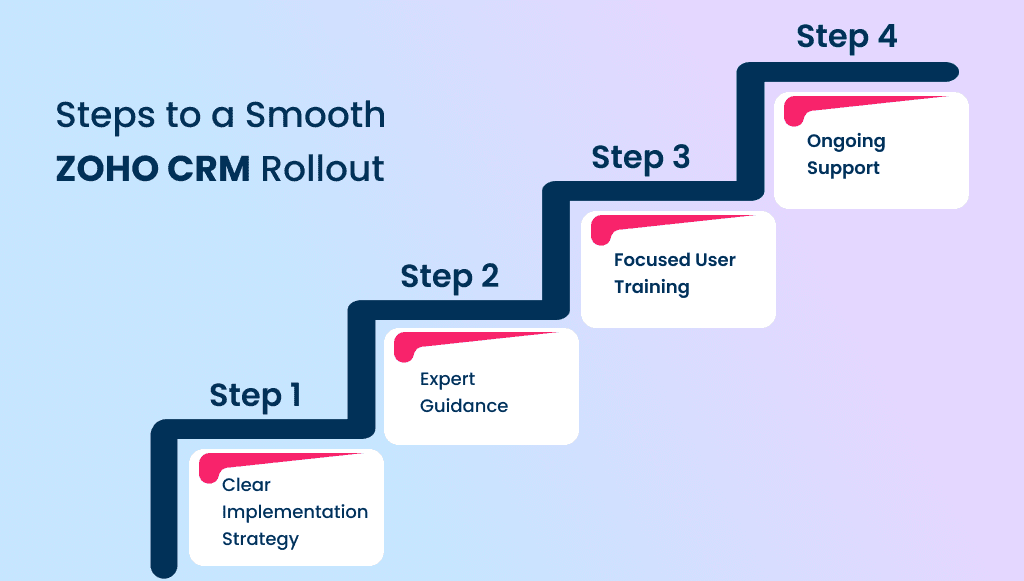
In order to avoid implementation issues, it is important to have a structured approach. There are a few simple things that, if followed, can improve the results significantly.
Implement a clear implementation strategy
Before configuring the CRM, it is important to have a clear picture of sales processes, lead management, and reporting needs. This ensures the system supports real business activities.
Working with experienced CRM experts
Working with experienced CRM experts will help a business navigate the configuration, integrations, and workflow design. Experienced experts will also help a business properly integrate applications like Zoho CRM and Xero Integration.
Prioritising user training
User training is an essential aspect in ensuring that the employees within the organisation are able to effectively utilise the Zoho CRM system. Training programmes such as the Zoho CRM Admin Training and the Zoho CRM Training for Administrators are essential in ensuring that the administrators within the organisation are able to effectively maintain the system.
Maintain ongoing system support
The CRM system needs regular updates, checkups, and system adjustments. Reliable Zoho CRM Support and Maintenance ensure that businesses continue to operate efficiently through the system.
Dedicated CRM support teams provide support, updates, and system checkups. This ensures that the businesses continue to operate efficiently through the system.
Final Thoughts
As seen from the above analysis, it is clear that Zoho CRM is an efficient system that has the ability to revolutionise how businesses operate in their respective fields. However, it is important to note that the success of the system will depend on how it is implemented in the organisation. Mistakes, such as poor migration and integration, often cause frustration for the employees in the organisation.
Through proper planning, Australian businesses can create a CRM that is beneficial for their growth. When correctly implemented, the Zoho CRM System is not just a simple database; it is the core of the operation, bringing the entire sales, finance, and customer relationship process into one efficient system.
Don’t let implementation pitfalls hold you back. Work with Flexbox Digital for Zoho CRM support, training, and consulting for Australian businesses.